How to Make ChatGPT Remember You Across Conversations (2026 Guide)
How to make ChatGPT remember: ChatGPT has four memory features in 2026. Here's what Custom Instructions, Memory, Projects, and Custom GPTs each do, and when.
How to Make ChatGPT Remember You Across Conversations (2026 Guide)
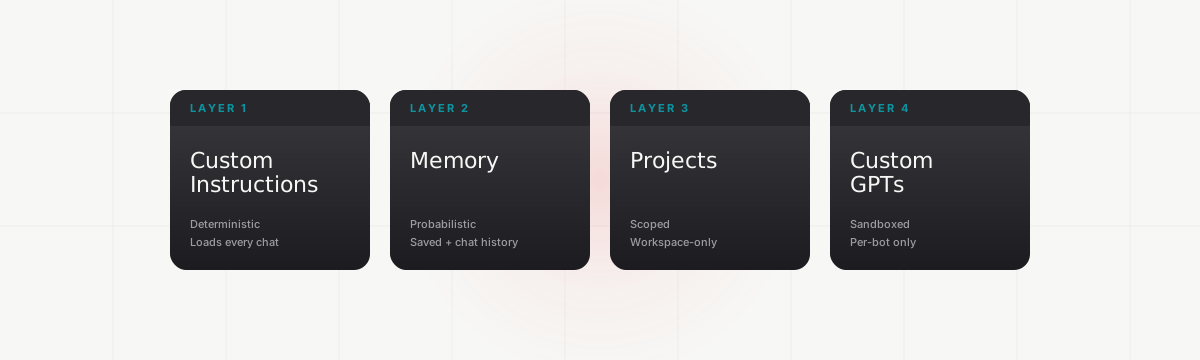
ChatGPT has four memory features in 2026, and most users only use one. The other three exist for a reason. They handle the cases the first feature can't, and knowing when to reach for which solves most of the why does ChatGPT keep forgetting frustration.
The four layers are Custom Instructions (deterministic), Memory (probabilistic), Projects (scoped), and Custom GPTs (sandboxed). Each handles a different kind of context. Most people configure Custom Instructions once, lean on Memory for everything else, and never touch Projects or Custom GPTs. That mismatch is where the forgetting comes from.
Key Takeaways
- ChatGPT's memory is four separate systems, not one. Each has different rules for what it persists and when.
- Custom Instructions load every chat verbatim. Memory loads probabilistically. Projects scope context to a workspace. Custom GPTs sandbox context inside a single bot.
- The fastest fix when ChatGPT keeps forgetting is usually moving the right rule into Custom Instructions and the right context into a Project, instead of trusting Memory with both.
How does ChatGPT memory actually work in 2026?
ChatGPT memory is four separate systems running in parallel, not a single feature. The official ones are Custom Instructions, Memory (with two sub-toggles), Projects, and Custom GPTs.1 Each persists context differently and applies to a different scope.
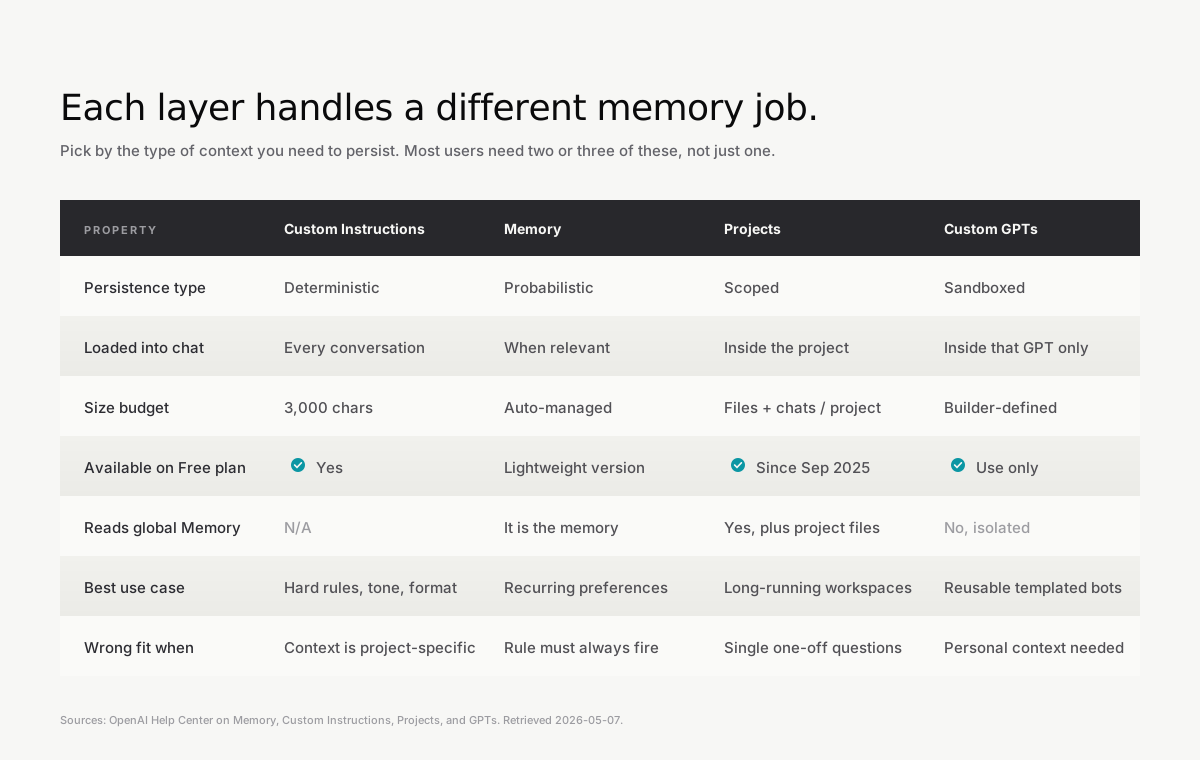
The reason most posts treat memory as a single feature you turn on is that the marketing pitch is simple. The reality is that each layer is doing something different under the hood.
Custom Instructions is a system-prompt extension. Whatever you put in the long-form text field gets injected into the front of every new chat, verbatim, before your first message lands.2 It's deterministic. It always fires.
Memory is two sub-features. Saved memories are explicit facts ChatGPT files away when you tell it to or when it decides something is worth keeping. Reference chat history, added in April 2025, lets ChatGPT pull implicit context from prior conversations.3 Both are probabilistic. ChatGPT decides what to recall based on what it thinks is relevant.
Projects are scoped workspaces. A Project has its own files, its own custom instructions, and its own chat history. Inside a Project, ChatGPT prioritizes Project context over your global Memory, and Project chats don't write back to your global memory dossier.4
Custom GPTs are sandboxed bots. They don't read your saved memories or your global chat history at all.5 They have their own optional memory, configured by the builder, isolated from everything else.
How to set up Custom Instructions for maximum recall
Custom Instructions is the layer most worth getting right first, because it's the only one that loads every chat without fail. Settings > Personalization > Custom Instructions exposes a long-form text field capped at 1,500 characters.2 The field gets injected verbatim into every new chat.
Use part of it for the facts that should anchor every response. Your role, your domain, your hard constraints, the tools you use, the audiences you write for. Anything you'd be annoyed to retype every conversation belongs here.
Use the rest for output rules. Tone, format, length defaults, what to skip, what to always include. Rules like never use em dashes or answer in bullet points unless I ask for prose live here.
Two practices matter more than the contents of either field. Keep both fields project-agnostic, since they fire on every chat including ones unrelated to your main work. And make rules concrete rather than aspirational. Use plain language is too vague to act on. Avoid words like leverage, robust, and utilize gives the model something it can actually do.
The 3,000-character total budget is small, which is the point. Custom Instructions is for the load-bearing rules. Anything project-specific goes in a Project's instructions instead, where it can be longer and won't pollute unrelated chats.
How to use ChatGPT Memory effectively
Memory in 2026 is two switches, not one, and the right setup for most power users is one on and one off. Settings > Personalization > Memory exposes both: Saved Memories and Reference Chat History.
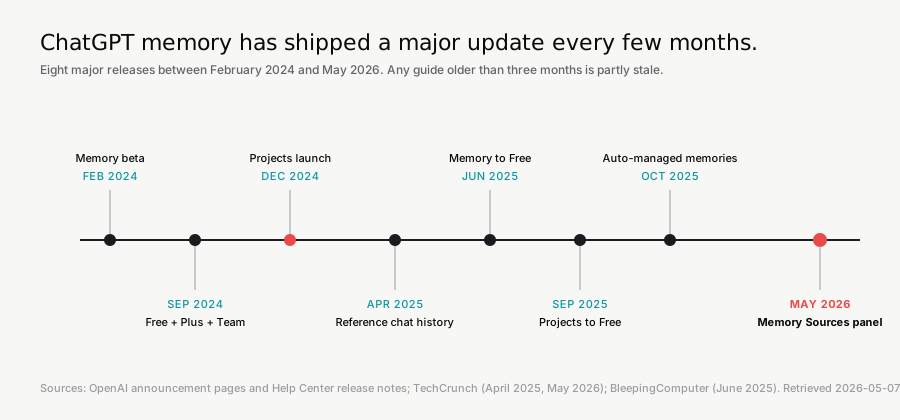
Saved memories are facts you can audit. Open the same settings panel and you'll see the list of what ChatGPT thinks it knows about you. You can edit individual entries, delete them, or wipe the whole store.1 OpenAI also auto-manages the list since October 2025, demoting older entries instead of throwing the memory-full error people used to hit.6
Reference chat history is the one to think harder about. It pulls implicit context from old conversations the same way RAG pulls from documents, except the model is the only one deciding what's relevant. Simon Willison reverse-engineered the actual injection in May 2025 and found it stores not just user-stated facts but also IP location, device type, account age, and rolling usage statistics.7 Useful as personalization, occasionally surprising as privacy.
The contrarian configuration: keep saved memories on (you can audit them), turn reference chat history off (you can't audit it). You'll get most of the upside of personalization without the implicit dossier. If a workflow truly benefits from chat-history reference, turn it on for that period and back off afterward.
In May 2026, OpenAI added a Memory Sources panel that shows which saved memories, past chats, custom instructions, files, or connected services contributed to a given response.8 OpenAI's own Memory FAQ notes the panel may not show every factor that shaped an answer,1 so treat it as directionally useful, not exhaustive.
When should you use Projects instead of Memory?
Projects are the right answer any time the context belongs to a specific workspace and not to your general personalization. A book draft, a client account, a codebase, a job search, a medical question. All of those benefit from being walled off from your global Memory.
A Project has scoped instructions (longer than your global Custom Instructions), attached files, and chat history that doesn't bleed into your main account memory.4 Inside the Project, ChatGPT prioritizes Project files and Project chats over global context.
Projects launched in December 2024 and reached the free tier in September 2025.9 If you've been on ChatGPT for years and never opened the Projects sidebar, you're probably putting context into Memory that should be in a Project. Three signs you should switch:
The chat is part of an ongoing thing with its own files (a book, a client, a codebase). The context is sensitive enough that you don't want it in your global memory dossier. You'd want a clean workspace per project rather than one mixed memory stream.
Project chats can still reference Project files and Project history without writing back to global Memory. That makes Projects the cleanest delete-and-start-over escape hatch for any workflow you want to keep separate.
Why does ChatGPT still forget sometimes?
Two reasons, both technical.
The first is the context window. Every chat has a finite token budget, and once a conversation exceeds it, the earliest messages drop out of the model's working scratchpad. GPT-5.5 in the API supports 1M tokens, but ChatGPT-side caps are smaller. On Plus, GPT-5.5 Instant runs about 32K and GPT-5.5 Thinking about 256K; ChatGPT Pro lifts those to 128K Instant and 400K Thinking.10 The context window is not memory. It's the working surface for one session, and it disappears when the chat ends.
The second is that Memory is summarized and probabilistic. ChatGPT doesn't run a search over your entire chat history every time you ask a question. It maintains a continuously rewritten summary of what it thinks you'd want it to remember, and that summary gets injected into new chats.7 Summarization loses detail. The summary can also carry stale or wrong facts forward silently, which is why complaints about ChatGPT thinking a user still lives in their old city are common.
Memory also doesn't proactively store sensitive categories like health or financial details unless you explicitly ask.1 If you've told ChatGPT about a medication and it isn't bringing it up later, that's working as designed.
When native memory hits its limits
ChatGPT memory in 2026 is genuinely good for everything that lives inside ChatGPT. The limit is the boundary at the edge of the product. Memory doesn't transfer to Claude, Gemini, Copilot, or any other tool. There's no clean export. When OpenAI swaps default models (GPT-5.5 Instant replaced GPT-5.3 Instant on May 5, 2026, with paid users keeping 5.3 access for three months), behavior shifts in ways that touch how Memory surfaces context.11
If your work happens entirely inside ChatGPT, this isn't a problem. If you also use Claude for coding or another tool for research, every context switch is a cold start. We're building MemoryBase to close that gap, syncing conversation context across ChatGPT and Claude so the work you've already done in one tool doesn't disappear when you open the other. It's pre-launch, and the four-layer setup above stands on its own whether you ever use it.
For more on cross-tool friction specifically, see our guide to sharing context between ChatGPT and Claude.
Frequently asked questions
Why does ChatGPT forget what I told it?
Two layers fail differently. The chat's context window holds your current conversation in working memory and drops earlier messages once it fills up (around 32K tokens for Instant on Plus, 256K for Thinking).10 Memory is a separate persistence layer that summarizes what's worth keeping, but it's probabilistic, so it sometimes won't surface a fact even if it's stored.7 Custom Instructions is the only layer that fires every time.
Does ChatGPT have long-term memory?
Yes, but spread across four features. Saved Memory and Reference Chat History (both in Settings > Personalization > Memory) handle long-term recall on the main account. Projects scope long-term context to a workspace. Custom Instructions act as a permanent rule set that loads every chat.
What are the limitations of ChatGPT memory?
The two big ones in 2026 are scope and reliability. Memory doesn't transfer to other AI tools (Claude, Gemini, Copilot) and there's no clean export.1 Within ChatGPT, Memory is summarized and probabilistic, so it can carry stale facts forward or skip relevant ones. Custom Instructions is deterministic but capped at 1,500 characters in the long-form text field.2
Is ChatGPT Memory available on the free plan?
Yes, as of June 2025, in a lightweight version that references recent conversations only.12 Free users get saved memories, basic chat-history reference, and Projects. Plus, Pro, Team, and Enterprise tiers get deeper recall windows and higher Project limits. The full reference-chat-history feature is paid-tier in the EEA, Switzerland, Norway, Iceland, and Liechtenstein, where it requires explicit opt-in.
How do I delete or edit something ChatGPT remembered wrong?
Open Settings > Personalization > Memory and you'll see the list of saved entries. Each has a delete button. You can also tell ChatGPT in any chat to forget that I [X] and it will remove the matching entry. To wipe everything at once, use the Clear ChatGPT's Memory button on the same settings page.1
What's the difference between Custom Instructions and Memory?
Custom Instructions is deterministic. It loads verbatim into the system prompt of every chat. Memory is probabilistic. It surfaces context when ChatGPT decides it's relevant. Use Custom Instructions for hard rules like never write code in Python 2 and Memory for ongoing facts like my dog's name is Hugo.
Can I share ChatGPT memory across other AI tools like Claude?
Not natively. ChatGPT memory stays inside ChatGPT, and Claude memory (which Anthropic launched in September 2025 and extended to free users with an import tool in March 2026) stays inside Claude.13 Cross-tool memory requires a third-party layer that syncs conversation context between accounts.
Sources
- OpenAI Help Center, Memory FAQ. Retrieved 2026-05-07.
- OpenAI Help Center, ChatGPT Custom Instructions. Retrieved 2026-05-07.
- TechCrunch (April 10, 2025), OpenAI updates ChatGPT to reference your past chats.
- OpenAI Help Center, Using Projects in ChatGPT. Retrieved 2026-05-07.
- OpenAI Help Center, Does memory function with GPTs? Retrieved 2026-05-07.
- OpenAI on X (October 15, 2025), Auto-managed saved memories announcement.
- Simon Willison (May 21, 2025), I really don't like ChatGPT's new memory dossier.
- TechCrunch (May 5, 2026), OpenAI releases GPT-5.5 Instant, a new default model for ChatGPT.
- OpenAI (December 13, 2024), ChatGPT release notes: Projects announcement. Retrieved 2026-05-12 via Wayback (snapshot dated 2024-12-19).
- OpenAI (April 23, 2026), Introducing GPT-5.5.
- OpenAI Help Center, Model Release Notes. Retrieved 2026-05-07.
- BleepingComputer (June 3, 2025), ChatGPT rolls out Memory upgrade for free users.
- 9to5Mac (March 2, 2026), Free Claude users can now use memory and import context from rivals.