Stop Re-Explaining Your Project to Every AI (2026 Fix)
Most multi-tool AI users juggle five separate memory stores that don't talk to each other. Here's the fix stack power users use to stop re-explaining.
Stop Re-Explaining Your Project to Every AI (2026 Fix)
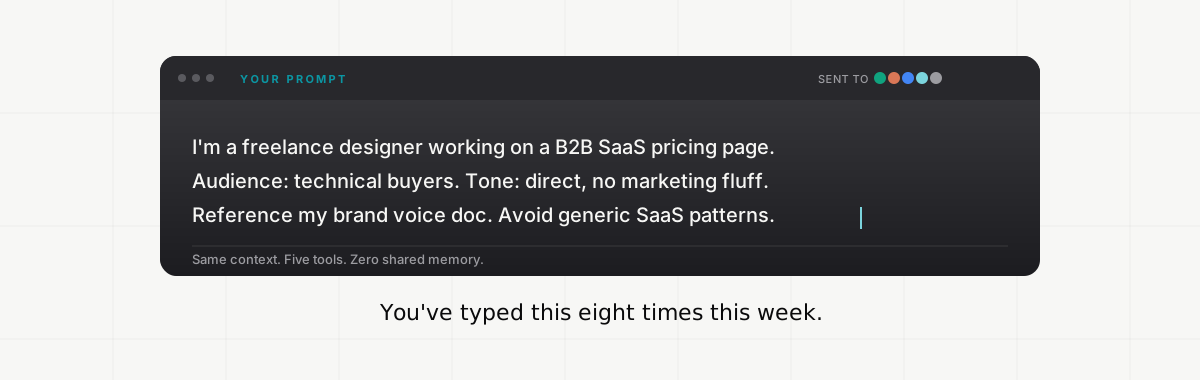
Most multi-tool AI users now run at least five separate memory stores in parallel, and none of them talk to each other. Every major AI tool ships its own version of a remember-this command, and the only bridge between them is your copy-paste habits. Memory is no longer scarce. It's fragmented across more places than you can maintain by hand.
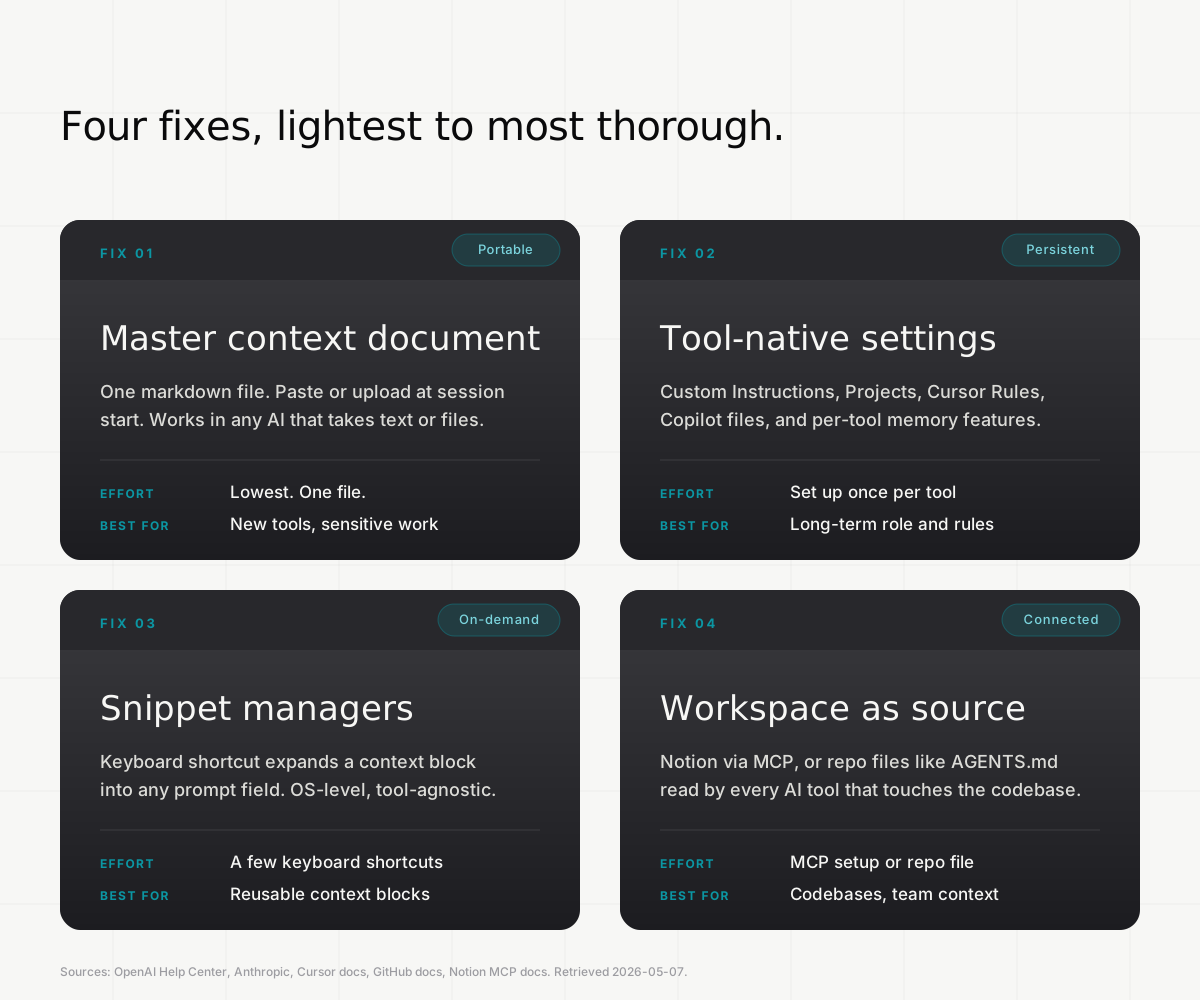
This post is a fix stack, not another use-Memory walkthrough. Four patterns that reduce the re-explanation tax across whatever AI tools you actually use, plus where the stack runs out. The smallest fix is one document. The deepest fix lives outside any single AI.
Key Takeaways
- 84% of developers report using AI in their workflow, with the top assistants (ChatGPT, GitHub Copilot, Gemini, Claude Code) showing heavy overlap. Almost everyone serious about AI is running multiple tools in parallel.1
- The friction is not that memory is missing. It's that you have a separate memory store in every tool, and they don't sync.
- Four-fix stack: a master context document, tool-native settings (Custom Instructions, Projects, Cursor Rules, Copilot files), snippet managers for repeated context, and a workspace tool as the source of truth. Most workflows need two or three of these.
Why you're re-explaining context every chat
Two things break at once. The chat's context window holds your current conversation in working memory and drops earlier messages once it fills up, which is why long sessions feel like the model gets dumber halfway through. That's the in-session problem. The cross-session problem is bigger: each tool runs its own independent memory store, and switching tools means starting from zero.
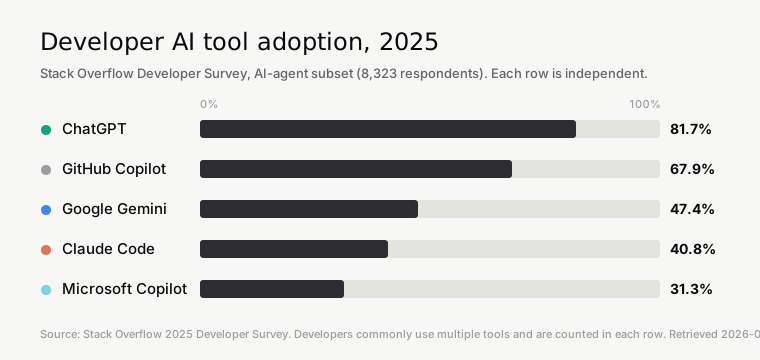
The 2025 Stack Overflow Developer Survey put numbers on this. 84% of developers report using or planning to use AI in their workflow. Among developers building on AI agents, ChatGPT (81.7%), GitHub Copilot (67.9%), Google Gemini (47.4%), and Claude Code (40.8%) all show heavy adoption, which arithmetically guarantees most professionals are running two or three at the same time.1
Anthropic's March 2026 Economic Index report found that high-tenure Claude users have a 10% higher success rate on conversations than newer users, attributed to learning by doing in how to set context.2 Re-explaining is a learnable skill, but a slow one. The faster fix is making context portable so you stop remastering the same setup in five tools.
Fix 1: Build a master context document
The smallest and most portable fix is one markdown file. Call it context.md or about-me.md. It contains the things you'd be annoyed to retype: your role, your domain, the specific projects you're working on, your preferences, your constraints. You paste or upload it whenever a tool doesn't already know.
A useful master doc has three sections. Role and domain in two or three sentences (what you do, who you do it for, the audiences you write or build for). Active projects with short context blurbs (one paragraph each, what they are, what stage they're in, who else is involved). Hard preferences as a bulleted list (tools you use, tones to avoid, formats you want, words you ban).
Length matters less than precision. Claude Pro accepts 200K tokens of context per chat, so you can paste a small book.3 ChatGPT Plus on the default GPT-5.5 Instant runs around 32K tokens, which still fits a multi-page doc easily. Cursor and Copilot read repo files of any size. The doc is the universal lingua franca: it works in every AI that takes pasted text or file uploads.
The trick is keeping it current. Every time you find yourself retyping a context block in a chat, paste that block into the doc afterward. The doc becomes denser over time without ever requiring a scheduled update.
Fix 2: Set up tool-native context (Custom Instructions, Projects, Rules)
Once you have a master doc, the next fix is mirroring its load-bearing parts into each tool's native settings so you don't have to paste it for routine work. Each major tool has its own equivalent:
- ChatGPT Custom Instructions: a long-form field capped at 1,500 characters that prepends every chat.4
- ChatGPT Projects: scoped workspace launched December 2024, each Project has its own files, instructions, and chat history that overrides global settings.5
- Claude Projects: launched June 2024 with a 200K-token context window per project, bundles documents and persistent custom instructions on Pro and Team plans.6
- Cursor Rules: live in
.cursor/rules/*.mdcfiles at the repo root (project-scoped, version-controlled), with optional global User Rules.7 - GitHub Copilot: reads
.github/copilot-instructions.mdat the repo root for repository-wide rules, plus path-specific rules in.github/instructions/*.instructions.md.8 - Gemini Gems: Google's custom-AI-expert feature, which lets you ground a Gem with attached files for project-specific context.9
The trap to avoid: don't paste your full master doc into every tool. Each tool has its own size budget and its own behavior model. ChatGPT Custom Instructions are deterministic (load every chat). Claude memory is probabilistic. Cursor rules apply only inside Cursor. The right move is to put the right slice of context into the right tool, not the same context everywhere.
A practical default: hard rules and tone go in Custom Instructions and Cursor User Rules. Project-specific context goes in Projects, Custom GPTs, or .cursor/rules. Repo-specific guidance goes in copilot-instructions.md or AGENTS.md, the cross-tool standard adopted in over 60,000 open-source projects by late 2025 and donated to the Linux Foundation that December.10
Fix 3: Use snippet managers for repeated context blocks
For context blocks you paste in fresh chats but don't want stored in any tool's memory, snippet managers turn keystrokes into pasted text. Raycast Snippets, macOS Text Replacements, AI Prompt Genius (Chrome extension), and TextExpander all do roughly the same thing: type a short trigger, get a long block.11
The pattern that works: save four or five context blocks as keyboard shortcuts. ;ctx-self for your role and preferences. ;ctx-proj-bookname for the current book project. ;ctx-client-acme for a specific client. ;ctx-stack for your tech stack. The shortcut expands inline anywhere you can type, including the prompt box of any AI tool.
The advantage over Memory or Projects is control. You decide what context loads and when. A snippet doesn't carry stale information forward silently. It's also tool-agnostic by definition, since it operates at the OS level.
Fix 4: Anchor context in your workspace, not the AI
The deepest fix is making your workspace tool the source of truth and letting AI read it on demand. The recent shift here is the Model Context Protocol (MCP), which lets Claude, ChatGPT Pro, and Cursor query Notion, Obsidian, GitHub, and other tools directly, with permission scoping intact.12
Two patterns work. MCP-connected: link Notion or your wiki to your AI tools through MCP. The AI reads from the workspace, you maintain context once, every connected AI sees it. File-based: keep your context in files committed to the repo (AGENTS.md, CLAUDE.md, copilot-instructions.md). The repo becomes the portable context layer for any tool that touches the codebase.
The trade-off is setup cost. MCP requires configuration. File-based requires discipline about keeping the files current. The upside is that you stop maintaining the same context across five places. One canonical source, many readers.
Where the fix stack runs out
Even with all four fixes in place, one gap remains. Memory built up inside ChatGPT through saved memories and chat-history reference does not transfer to Claude, Gemini, or any other tool. Anthropic extended Claude memory to free users with a cross-AI import tool in March 2026 (the feature originally launched September 2025 for Team and Enterprise). The import is a one-shot copy-paste workaround, not a sync.13 Every subsequent change still has to be re-imported by hand.
This is the cross-tool gap MemoryBase is being built for, syncing conversation history across ChatGPT and Claude so context follows you instead of getting locked into whichever app you happened to use it in. It's pre-launch, and the four-fix stack above stands on its own without it. For more on the wedge specifically, see our guide to sharing context between ChatGPT and Claude.
Frequently asked questions
Why does ChatGPT or Claude forget my context every conversation?
Two reasons. The chat's context window has a finite token budget and drops earlier messages once it fills up.14 Across sessions, each tool runs its own independent memory store. ChatGPT memory stays in ChatGPT, Claude memory stays in Claude, and there's no native cross-tool sync. Each tool's memory is also probabilistic, so it sometimes won't surface a fact even when the fact is stored.
What's the fastest way to give an AI my full project context?
Maintain a single context.md file with your role, active projects, and hard preferences. Paste it (or upload it as a file) at the start of any new chat. For Claude Pro, the 200K-token context window means a long doc fits with room to spare. For ChatGPT Plus on the default Instant model, around 32K tokens fit, which is still many pages of structured context.3
Can I share context between ChatGPT, Claude, and other AI tools?
Not natively. ChatGPT memory stays in ChatGPT, Claude memory stays in Claude. Anthropic shipped a one-shot import tool in March 2026 that copies a memory profile from one AI into Claude, but it's a manual copy-paste, not a live sync.13 Cross-tool sharing requires either keeping context in a portable file (master doc, AGENTS.md, MCP-connected workspace) or a third-party sync layer.
How do I personalize ChatGPT responses across all conversations?
Three layers. First, fill in Custom Instructions at Settings > Personalization (a long-form field capped at 1,500 characters that prepends every chat).4 Second, turn on saved memories so ChatGPT keeps facts you tell it to remember.15 Third, use Projects for anything workspace-specific. For a full breakdown, see how to make ChatGPT remember across conversations.
What's the difference between Memory and Custom Instructions in ChatGPT?
Custom Instructions is deterministic. Whatever you put in the long-form field gets injected verbatim into the front of every chat.4 Memory is probabilistic: ChatGPT decides when stored facts are relevant and surfaces them only sometimes. Use Custom Instructions for hard rules like never use em dashes or answer in plain language. Use Memory for ongoing facts like the cat's name is Hugo or the book launches in November.
Sources
- Stack Overflow, 2025 Developer Survey: AI section. Retrieved 2026-05-07.
- Anthropic (March 24, 2026), Economic Index report: Learning curves.
- Anthropic Help Center, How large is the context window on paid Claude plans? Retrieved 2026-05-07.
- OpenAI Help Center, ChatGPT Custom Instructions. Retrieved 2026-05-07.
- OpenAI (December 13, 2024), ChatGPT release notes: Projects announcement. Retrieved 2026-05-12 via Wayback (snapshot dated 2024-12-19).
- Anthropic (June 25, 2024), Collaborate with Claude on Projects.
- Cursor, Rules documentation. Retrieved 2026-05-07.
- GitHub Docs, Adding repository custom instructions for GitHub Copilot. Retrieved 2026-05-07.
- Google (August 2024), Google Gemini updates: Custom Gems and improved image generation.
- Linux Foundation (December 9, 2025), Linux Foundation Announces the Formation of the Agentic AI Foundation.
- Raycast, Snippets documentation. Retrieved 2026-05-07.
- Notion Developers, Notion MCP. Retrieved 2026-05-07.
- 9to5Mac (March 2, 2026), Free Claude users can now use memory and import context from rivals.
- OpenAI (April 23, 2026), Introducing GPT-5.5.
- OpenAI (February 13, 2024), Memory and new controls for ChatGPT.